How does TaskRabbit actually work?
By Kiss János 14 min read
What TaskRabbit is and how it fits together
Most people assume TaskRabbit sends out its own handymen.
It doesn’t.
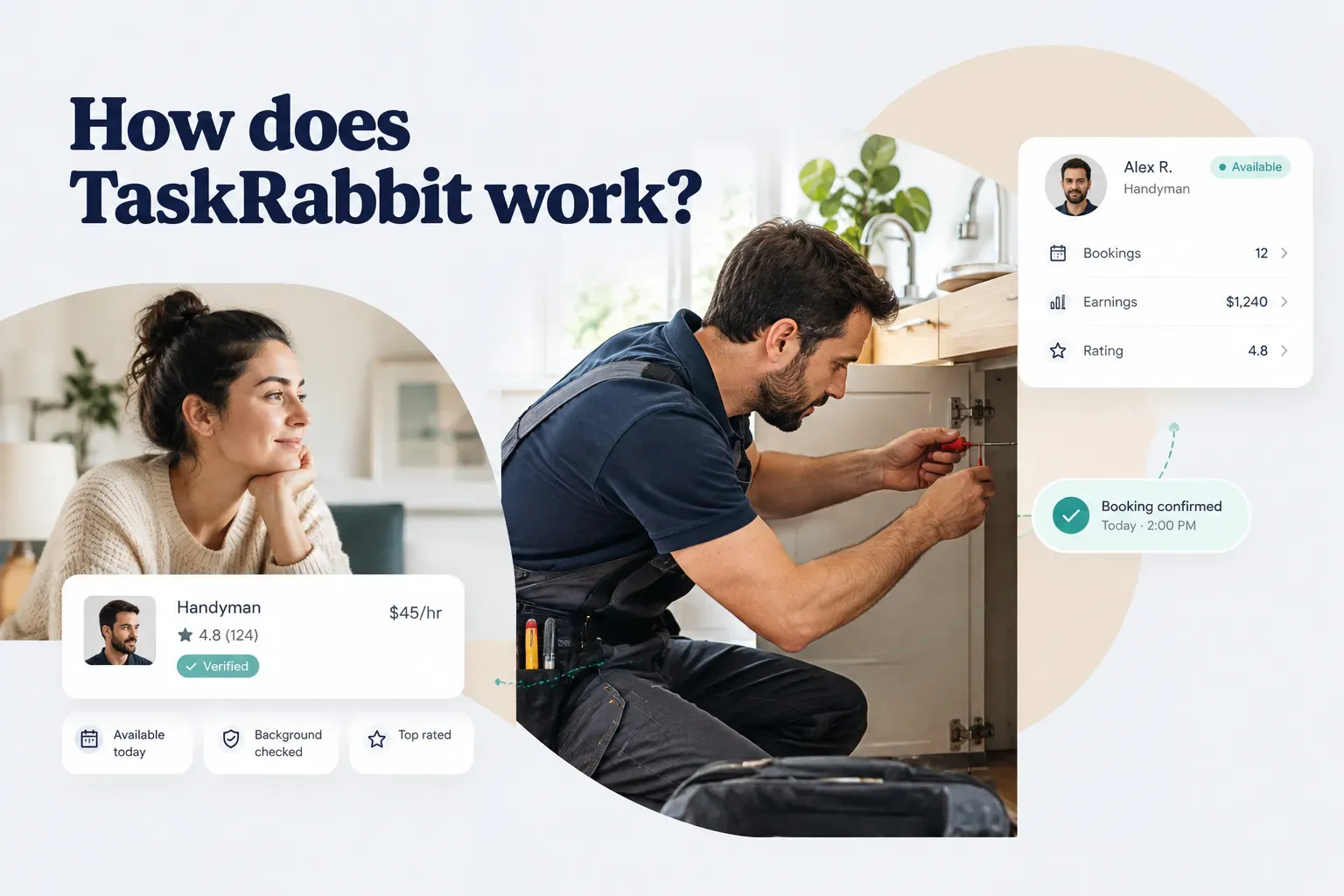
TaskRabbit is an online local services marketplace that connects customers with independent local workers, called Taskers, who handle jobs like furniture assembly, moving help, cleaning, TV mounting, and minor home repairs.
Think of it as a two-sided marketplace, similar to how a farmers’ market works. The market provides the space, the rules, and the payment system.
The vendors decide what to sell and at what price.
That distinction matters more than it seems.
TaskRabbit is not a staffing agency.
Taskers set their own hourly rates, choose which service categories they offer, and can accept or decline any job that comes their way.
So when you ask “how does TaskRabbit work,” the real answer has four parts:
First, there’s the booking flow, which covers how you find, choose, and schedule a Tasker. Second, the true cost, because the hourly rate you see is not the final number on your receipt.
Third, the safety and cancellation rules that protect you (and the ones that don’t). And fourth, the Tasker side, which explains why the marketplace behaves the way it does.
One caveat before we start: fees, coverage, and availability vary by city and change over time. Everything in this guide reflects how the platform generally operates as of 2026, but always confirm current terms on TaskRabbit’s site or at checkout before you book.
With that settled, here’s how a task moves from idea to completed job.
The booking process, step by step
Booking a Tasker takes about five minutes if you know what you need.
The part that trips people up isn’t the app.
It’s describing the job well enough to get the right person at the right price.
The process breaks into two phases: finding the right Tasker, then managing the job from confirmation to payment.
Finding and choosing a Tasker
The matching stage is where most of the value (and most of the mistakes) happen. A vague description attracts the wrong Taskers and invites billing surprises later.
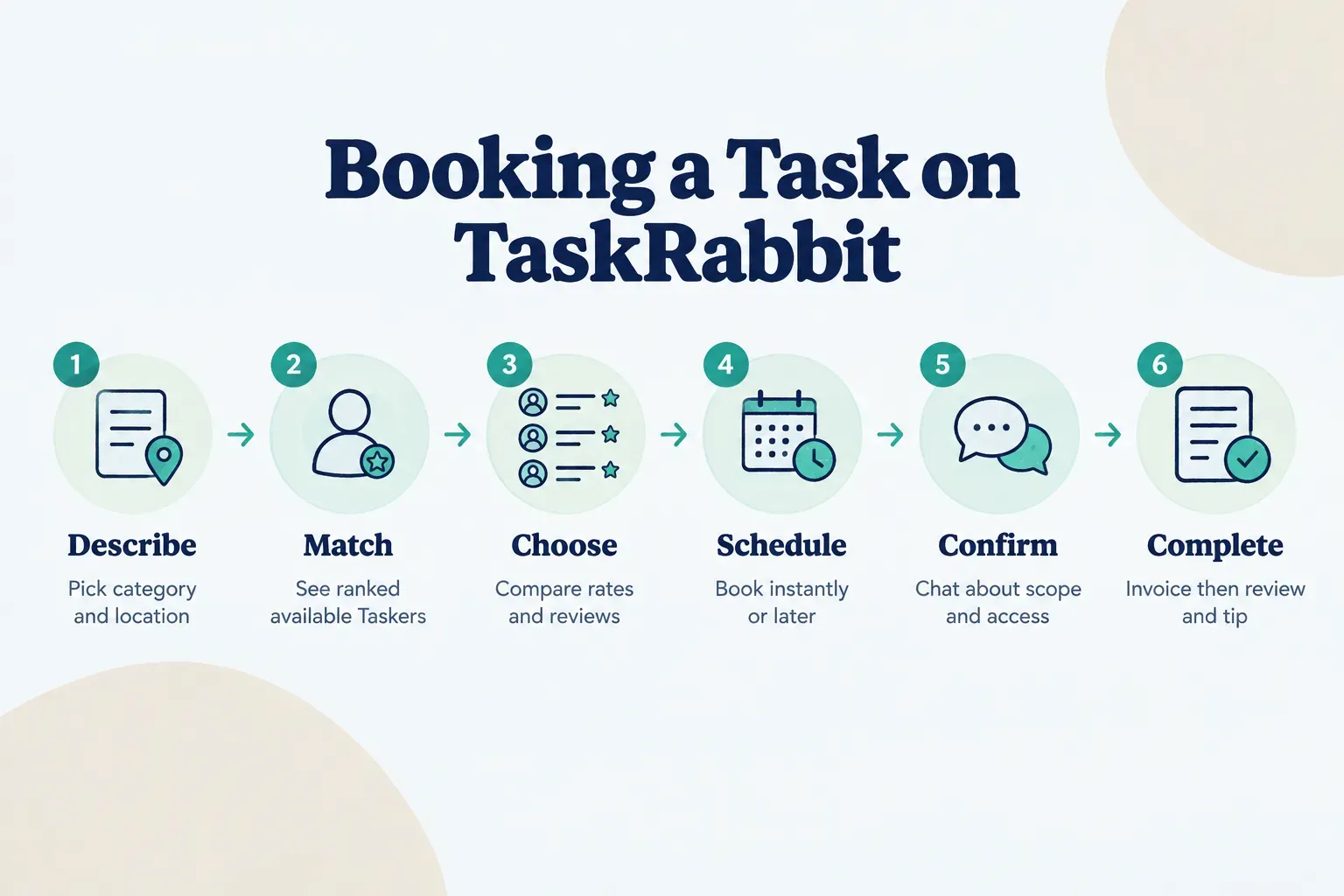
- Describe your task by category and location. Start by choosing a service category such as “Furniture Assembly” or “Help Moving,” then enter your address so the platform can check which Taskers cover your service area. You’ll usually answer a few follow-up questions, like task size (small, medium, or large) and whether you need a vehicle.
- Browse or get matched with available Taskers. TaskRabbit shows a list of Taskers ranked by factors including proximity, category fit, provider availability, price, and customer reviews. You can scroll the full list or let the platform surface a recommended match based on your task details and preferred time.
- Review specific Tasker profiles and pick one. Each Tasker profile shows their hourly rate, number of completed tasks in that category, overall rating, and written reviews, plus a short bio describing their experience and tools. You can choose someone directly, or accept the top match if you’d rather not compare a dozen profiles.
A quick tip on step three: the cheapest Tasker isn’t always the best value.
Someone charging $55 an hour who assembles a wardrobe in 90 minutes costs less than someone charging $35 who needs three hours.
From confirmation to completion
Once you’ve chosen a Tasker, the platform shifts into coordination mode.
This is where clear communication saves you money.
- Book an instant slot or schedule a time. Some Taskers offer same-day or next-day availability, while others let you schedule days or weeks ahead. During booking, you’ll add task details such as item counts, measurements, and any special instructions, and you’ll enter a payment card that stays on file.
- Use in-platform messaging to confirm the details. Before the Tasker arrives, use the built-in chat to confirm the task scope, parking situation, building access, elevator rules, and whether they’re bringing supplies or you are. Keeping this conversation inside the app also creates a written record if anything goes wrong later.
- Approve the invoice, then review and tip. After the job, the Tasker submits a digital invoice reflecting the actual hours worked plus any add-ons or expense reimbursement for materials. That invoice triggers the final charge to your card and opens a window where you can leave a review and add a tip.
Notice what’s missing from that flow: a big upfront payment.
Because you’re billed for actual time worked, a job that runs short costs less, and a job that runs long costs more.
That’s fair in both directions, but it’s also why a precise task description matters so much.
There are a few variations on this standard flow.
Recurring cleaning bookings let you schedule the same Tasker weekly or biweekly.
And a prepaid partner task, such as assembly bundled with a retail purchase, may come with a fixed price already paid through the retailer rather than an hourly invoice.
What you actually pay
The hourly rate on a Tasker’s profile is the starting point, not the final bill. Your total typically stacks five separate components, and only some of them go to the person doing the work.
Here’s what each piece is, who controls it, and where the money ends up. The figures below use an illustrative example: a Tasker charging $40 per hour for a two-hour job.
| Cost Component | Who Sets It | Example Amount | Who Keeps It |
|---|---|---|---|
| Tasker hourly rate ($40 × 2 hours) | The Tasker | $80.00 | Tasker |
| Service fee (percentage of rate, 15% used here) | TaskRabbit | $12.00 | TaskRabbit |
| Trust & Support fee (flat per task, $9 used here) | TaskRabbit | $9.00 | TaskRabbit |
| Expense reimbursement (supplies bought by Tasker) | Actual receipt cost | $15.00 | Tasker (repays their outlay) |
| Tip (15% of the $80 labor cost) | You | $12.00 | Tasker (100%) |
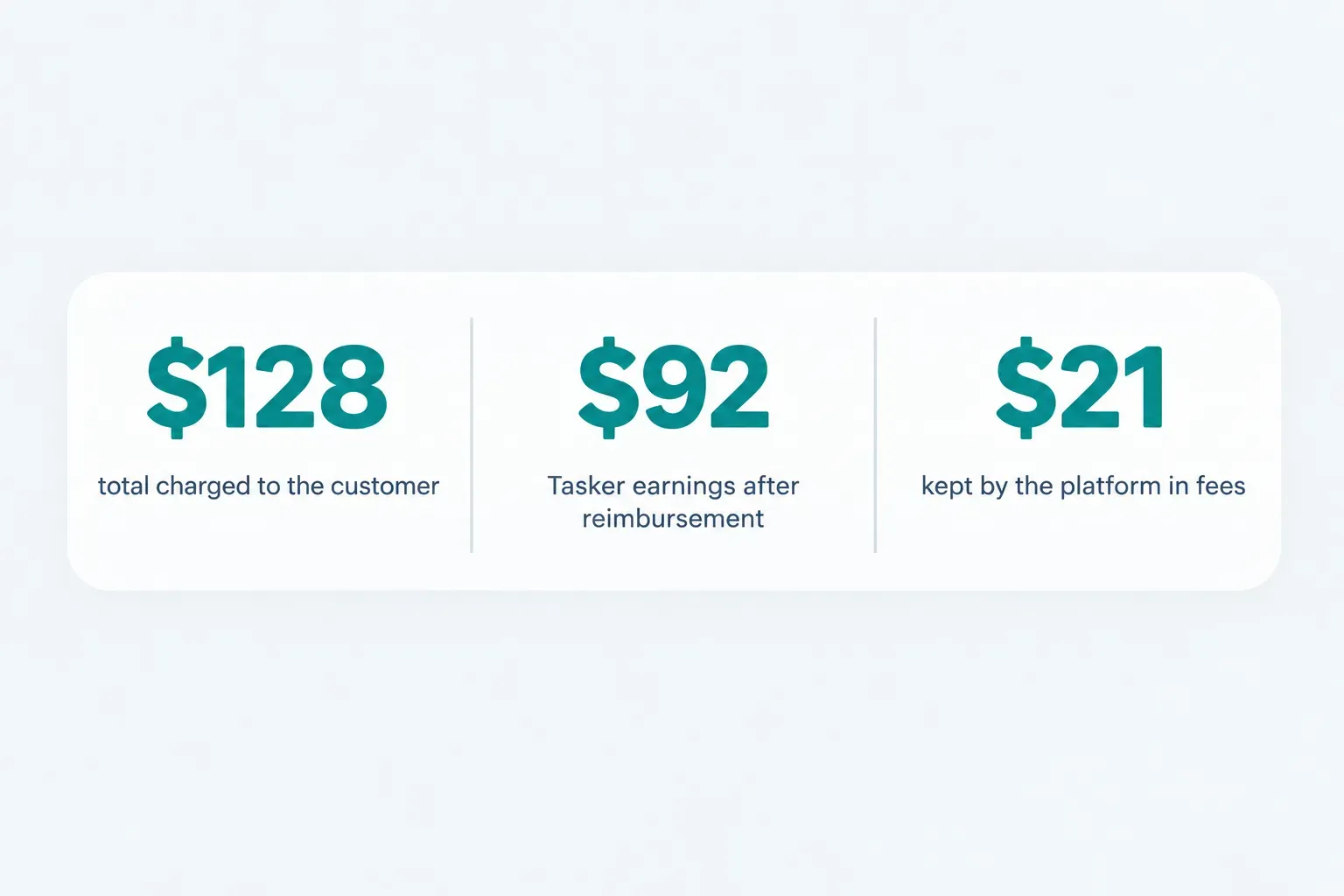
| Total charged to you | , | $128.00 | , |
Run the numbers and the split becomes clear.
Of your $128, the Tasker receives $107, but $15 of that simply reimburses supplies they already paid for.
Their actual earnings are $92 (the $80 rate plus the $12 tip).
The platform keeps $21 in fees.
A few details can shift that total in real life:
Minimum hours. Many Taskers set a one-hour minimum, and some categories, especially moving and heavy lifting, often carry a two-hour minimum. If you book a moving helper for a 40-minute job, you’ll likely still pay for two hours.
Service fee variation. The percentage service fee isn’t a universal constant. It can differ by market, and TaskRabbit has adjusted its fee structure several times over the years, so the 15% in this example is a realistic placeholder, not a promise.
The Trust & Support fee. This fee funds customer support, safety programs, and the platform’s protection coverage. In some markets it’s shown as a flat amount, and its exact value has changed over time.
The practical rule: treat the Tasker’s hourly rate as roughly 70 to 80 percent of what you’ll actually pay, then check the itemized breakdown at checkout. That screen shows the current fees for your specific city and task.
One more thing about tips.
They’re optional, but they go entirely to the Tasker.
If someone handled a messy job well or finished faster than expected, a tip is the most direct way to reward that.
Safety, reviews, and cancellations
A green checkmark on a profile feels reassuring.
But what does it actually verify?
The honest answer is less than most customers think, which is exactly why you need to understand the three layers of protection: screening, reviews, and platform policies.
What background checks really cover
When someone signs up as a Tasker in most markets, TaskRabbit runs identity verification to confirm they are who they claim to be. In regions where it’s legally permitted, it also runs a criminal background check through a third-party screening provider.
That’s valuable.
It filters out people with certain disqualifying records and makes anonymous bad actors much harder to hide.
But understand the limits.
A background check is a snapshot taken at sign-up.
It doesn’t measure skill, work quality, punctuality, or how someone behaves six months later.
A Tasker with a spotless record can still assemble your bed frame wrong.
Screening laws also vary.
Some jurisdictions restrict what employers and platforms can check or consider, so the depth of screening in London may differ from the depth in Los Angeles.
Treat background checks as a floor, not a guarantee, and pair them with the next layer.
Reading reviews like a pro
A 4.9-star average tells you almost nothing on its own.
Customer reviews become useful only when you read them with a specific question in mind: has this person done my kind of job well, recently?
Here’s how to weigh them.
Start with category relevance.
A Tasker with 300 glowing reviews for yard work and two for TV mounting is essentially a beginner at mounting, whatever their overall rating says.
Next, check recency.
Reviews from the last three to six months reflect how someone works now.
A brilliant track record from 2022 matters less if recent reviews mention rushed jobs or late arrivals.
Then look for similarity to your own task.
If you’re mounting a 75-inch TV on brick, search the reviews for “brick,” “masonry,” or “large TV.”
Someone who has handled that specific challenge is worth more than a generalist.
Finally, favor written detail over stars.
Reviews that mention punctuality, communication, cleaning up afterward, or fixing a problem mid-job reveal reliability in a way that “Great job!” never will.
And a single thoughtful three-star review often teaches you more than ten generic fives.
Cancellations, no-shows, and refunds
Plans change.
The platform’s cancellation policy is designed to balance your flexibility against the Tasker’s lost income when a booked slot evaporates.
The standard window is commonly 24 hours.
Cancel more than a day before the scheduled start, and you typically pay nothing.
Cancel inside that window, and you may be charged a late cancellation fee, often equal to about one hour of the Tasker’s rate.
A no-show fee can apply if the Tasker arrives and can’t do the job because you’re absent or haven’t provided access.
That’s worth remembering if you live in a building with a locked lobby or tricky parking.
The rules flip when the Tasker cancels.
You shouldn’t be charged, and the platform will usually help you rebook with someone else.
Repeated Tasker cancellations also affect their standing on the platform, which gives them a strong incentive to show up.
Now the part people skip… and regret.
TaskRabbit’s protection program, referred to as Taskprotect, along with its dispute support, generally applies only to tasks booked and paid through the platform.
That coverage can help with eligible property damage or a job that wasn’t completed as agreed, subject to its terms.
If a Tasker suggests paying cash next time “to skip the fees,” understand what you’d be giving up.
No secure payment record, no invoice to dispute, no platform mediation, and likely no damage coverage.
The savings rarely justify the risk.
The Tasker side of the marketplace
Understanding how Taskers operate explains a lot of the customer experience.
Why do rates vary so widely for the same job? Why can one Tasker book you tomorrow while another is full for two weeks?
It all comes back to how the supply side works.
Employee or independent contractor?
Taskers are independent contractors, not TaskRabbit employees.
That single fact shapes almost everything about how they work.
As contractors in the gig economy, Taskers set their own schedules and rates.
They decide which jobs to accept, which neighborhoods to cover, and how many hours to work each week.
Some treat it as a full-time business; others pick up a few assembly jobs on weekends.
The trade-off is responsibility.
Taskers handle their own taxes, their own tools, their own transportation, and in many cases their own liability insurance.
They don’t receive employee benefits like paid leave or employer health contributions from the platform.
For customers, this means you’re hiring a small business owner, not an agency representative. Rates reflect each person’s experience, costs, and demand, which is why two Taskers offering the same service category might charge $35 and $75 an hour.
Setting up a Tasker profile
Getting onto the platform involves more than filling out a form. In many markets, new Taskers pay a one-time registration fee, pass identity verification and (where permitted) a background check, and then build out a profile.
The core setup decisions include:
Choosing categories. Taskers select the services they want to offer, from general handyman work to specialized jobs like smart home installation. Each category can carry its own rate.
Defining a work-area radius. Taskers set the geographic service area they’re willing to travel within. A tighter radius means less driving but fewer job offers.
Setting availability and hourly rates. Taskers mark the days and times they can work and set rates per category. New Taskers often price lower to win early bookings, then raise rates as reviews accumulate.
That last point is the engine of the whole system.
Completed jobs and positive reviews increase a Tasker’s visibility in search results and matching.
A new Tasker with zero reviews is nearly invisible; one with 200 strong reviews in a category gets steady work at premium rates.
On earnings, TaskRabbit has stated that in markets like the US, Taskers keep 100% of their posted rate and tips, with platform fees charged to the customer instead. Structures differ in some regions and for partner programs, so the effective share can vary.
Picking the right tool for the job
A task marketplace is excellent at some things and a poor fit for others. Using the wrong channel is the most common way people end up frustrated.
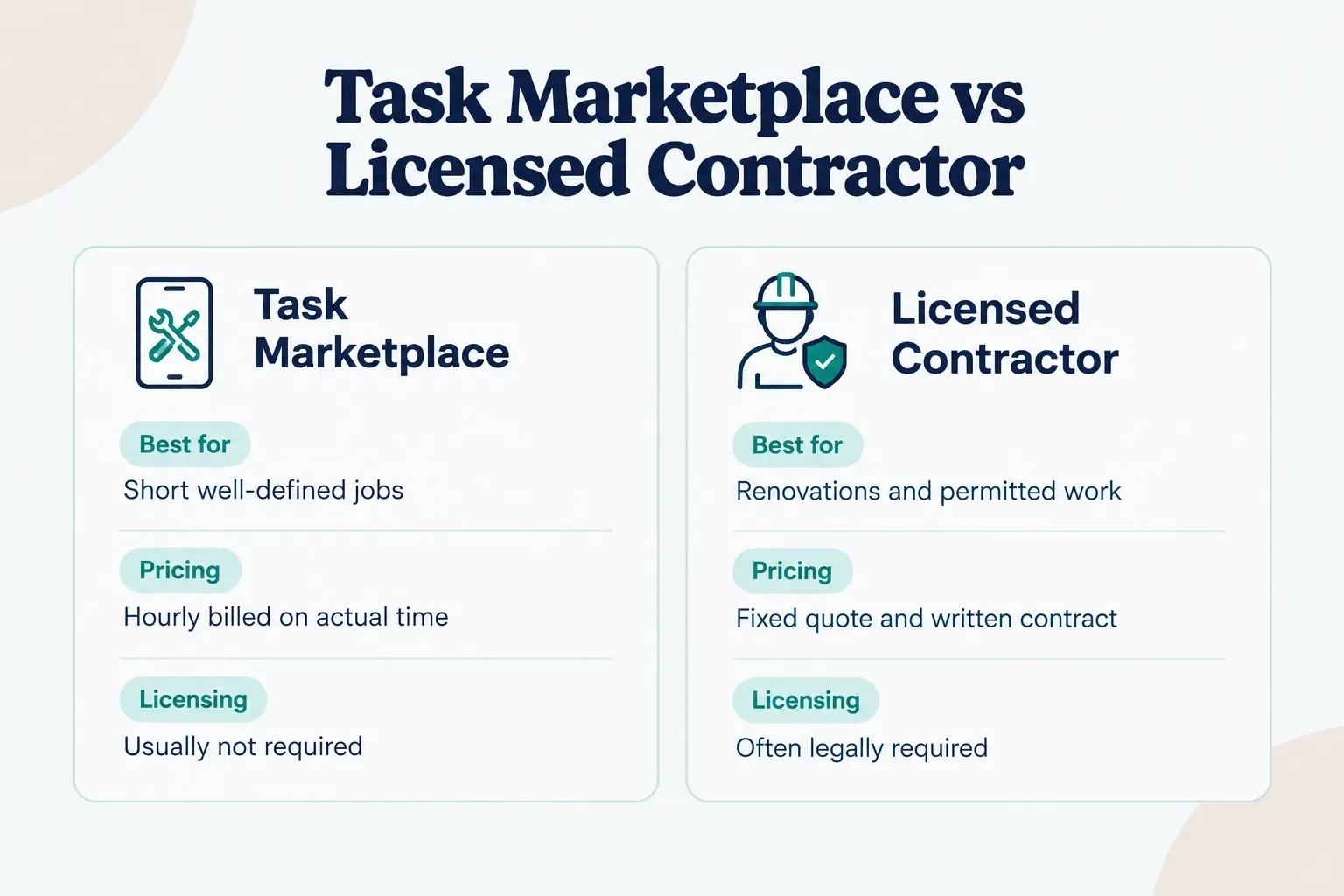
Use a task marketplace for well-defined, short jobs.
Assembling a desk, mounting shelves, hauling boxes up three flights, or deep cleaning before a move-out are ideal.
The task scope is clear, the hours are predictable, and you can judge quality immediately.
Hire a licensed contractor when you need a fixed-price quote, permits, or major renovation work. Electrical rewiring, plumbing relocation, structural changes, and kitchen remodels often legally require licensing, and you want a written contract, warranty, and proper insurance.
And do it yourself when the task is genuinely simple.
If you own a drill and a level, paying $60 or more in labor and fees to hang two picture frames probably doesn’t make sense.
Whichever platform you use, the same principles separate trustworthy service marketplaces from risky ones. TaskRabbit, general local-services apps, and newer entrants like Frendex all depend on the same foundations: clear scope, transparent pricing, verified providers, in-app communication, secure payment, and reviews tied only to completed bookings.
If a platform is missing any of those six elements, especially reviews that can only come from real, paid bookings, treat it with extra caution.
Before you book your first task
The single best thing you can do happens before you open the app. Write your task description first, complete with measurements, photos, parking and access notes, and a list of required tools or supplies.
That five-minute effort pays off twice.
You get matched with Taskers who actually fit the job, and you avoid the extra billed hour that comes from a Tasker arriving without the right drill bit or discovering a sofa won’t fit through the doorway.
Then apply one simple decision rule.
If the job is well-defined and short, a marketplace like TaskRabbit fits perfectly.
If it needs licensing, permits, or a fixed-price contract, look elsewhere.
Get that call right, and the rest of the process is easy.
Frequently asked questions
How does TaskRabbit work for customers?
TaskRabbit works by letting customers describe a task, choose from ranked local Taskers, and book a time through the app or website. You communicate through in-platform messaging, the Tasker completes the job, and you're charged after they submit an invoice for actual time and expenses.
Is TaskRabbit safe to use?
TaskRabbit is generally safe when you book and pay entirely through the platform. Taskers go through identity verification and, where legally allowed, a criminal background check, and on-platform bookings are eligible for dispute support and protection coverage. Paying off-platform removes most of those safeguards.
How much does TaskRabbit charge per hour?
TaskRabbit doesn't set a single hourly price, because each Tasker sets their own rate. Rates commonly range from about $30 to $90 or more per hour depending on category and city. On top of that rate, customers pay a percentage service fee and a Trust & Support fee, shown at checkout.
Do you pay TaskRabbit before or after the job?
You pay after the job, not fully upfront. Your card is stored at booking (and a temporary hold may appear), but the final charge happens once the Tasker submits an invoice reflecting actual hours, fees, and any reimbursed materials. Prepaid partner tasks are the main exception.
What percentage does TaskRabbit take from Taskers?
In the US, TaskRabbit states that Taskers keep 100% of their hourly rate and tips, since fees are charged to customers. In some other markets or partner programs, the effective take-home share has historically been closer to 80 to 85 percent. Terms change by category and market, so Taskers should check current rules.
Are TaskRabbit Taskers reliable and background checked?
Most TaskRabbit Taskers are background checked at sign-up where local law allows, but a background check doesn't measure reliability or skill. Reliability shows up in recent, category-specific reviews that mention punctuality and communication. Use screening and reviews together.
Need a hand with something?
The Frendex map shows you who is available near you, in real time.
Get the app free Get the app freeFree, no card needed
Related articles

Do you tip contractors? A clear answer for homeowners
No, tipping contractors isn't required. Get the 4-factor rule to decide when it's worth it and how much makes sense for your project.

How to hire a contractor without getting burned
A step-by-step process for vetting bids, licenses, and contracts, plus the one paper trail habit most homeowners skip until it costs them.

How much to tip in 2026: A clear decision guide
A percentage-vs-flat-fee framework covering 20+ scenarios, from tipping apps to movers. No more guessing when the screen flips to you.