The small business owner's guide to online booking
By Kiss János 14 min read
Contents
- The small business owner’s guide to online booking
- The small business owner’s guide to online booking
- Why booking still eats your day
- What a booking system actually does
- Does your business actually need one?
- Features that solve real problems
- From setup to measuring results
- Which setup fits you right now
- Frequently asked questions
The small business owner’s guide to online booking
The small business owner’s guide to online booking
Why booking still eats your day
Count the messages.
A typical solo service provider spends somewhere between four and eight hours a week just arranging appointments: answering “are you free Thursday?”, sending a reminder text the night before, rearranging when someone cancels at 9pm.
None of that is billable.
All of it feels like work.
The usual failure modes are familiar.
Phone tag with someone who only answers between 12 and 1. Bookings living in Instagram DMs where they get buried.
Two clients accidentally slotted into the same 2pm because the diary was in your head. And no-shows that nobody tracks, so nobody fixes.
This guide does not open with a software comparison chart.
That is the mistake most owners make, and it is why so many tools get abandoned after three weeks. It starts instead with mapping the way your service actually runs: how long jobs take, who delivers them, what happens between them.
By the end you will know exactly what a booking system for small business does, which features genuinely matter for service work, and how to choose, set up, and measure one without wasting a month on trial accounts.
What a booking system actually does
A booking system is software that shows real appointment availability, accepts a request, confirms it, reminds both sides, and tracks the status of that appointment without anyone picking up a phone.
That last clause is the whole point.
A tool that still requires you to reply manually is not a booking system.
It is a contact form with a calendar graphic.
How requests become confirmed bookings
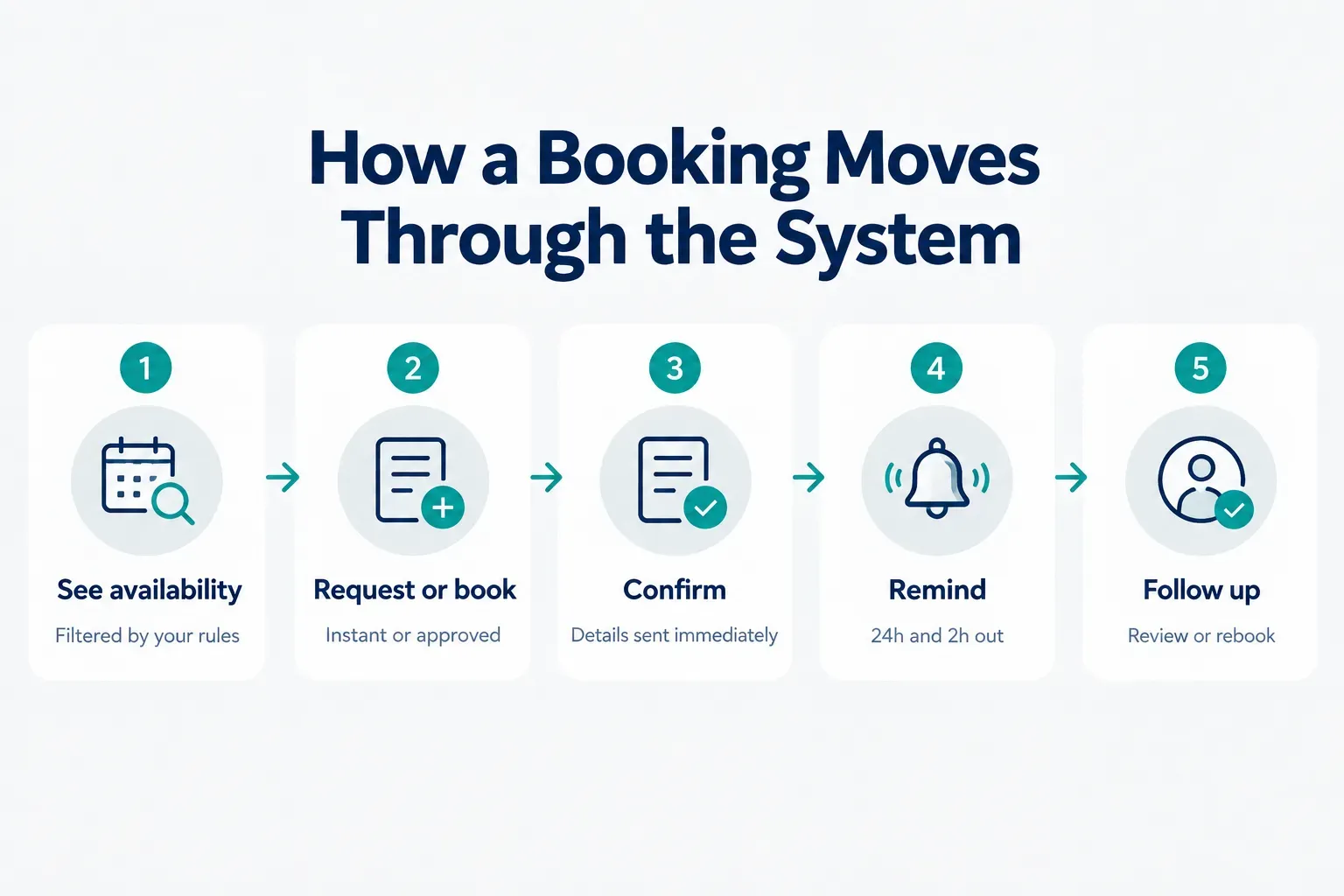
The flow has six stages, and most bad experiences come from a tool that skips one of them.
First, the customer sees genuine availability, filtered by your rules rather than raw free time.
Second, they either book instantly or submit a request.
Third, a confirmation lands immediately with the date, address, price, and cancellation policy.
Then come appointment reminders, usually 24 hours and 2 hours out.
The status updates if anything changes (rescheduled, cancelled, completed).
Finally, a post-service follow-up asks for a review or prompts a rebooking.
Instant booking puts the slot on your calendar the moment someone taps confirm.
It converts better, often dramatically, because there is no waiting.
Use it for standard, fixed-price, repeatable services.
Request-and-approve holds the slot pending your review. It is the safer choice for new customers you have never met, jobs needing a custom quote, high-value work, and anything where travel distance changes whether the job is even viable.
Most healthy service businesses run both: instant booking for the regular menu, request mode for custom or first-time work.
Five systems, five purposes
People use “booking system” to describe five very different products.
Buying the wrong category is the most expensive mistake in this whole process.
| Category | What it handles | Typical user | Key limitation |
|---|---|---|---|
| Meeting scheduler | Fixed-length calls synced to one person’s calendar | Consultants, coaches, sales reps | No service catalog, pricing, or travel logic |
| Appointment booking system | Variable durations, staff assignment, deposits, intake forms | Salons, clinics, studios, tutors | Brings no new customers; you supply the traffic |
| Reservation system | Capacity and seating across time blocks | Restaurants, venues, equipment hire | Built around tables or units, not skilled labour |
| Field service scheduler | Routes, travel time, job dispatch, on-site status | Plumbers, electricians, cleaners, movers | Heavier setup; often priced per technician |
| Service marketplace | Discovery, profiles, reviews, messaging, and booking together | Local providers competing for new clients | You share a platform with competitors |
A yoga teacher and a mobile mechanic both “take bookings”.
Only one of them needs route planning and a service-area radius.
The practical test: write down whether your biggest problem is admin or demand.
Admin problems are solved by service booking software you plug into your own website. Demand problems are solved by a marketplace where customers are already searching.
Does your business actually need one?
Not every business does.
If you take six bookings a month from repeat clients who text you directly, a paid tool is overhead.
But watch for the signals.
You are trading more than three messages to schedule a single appointment. You miss calls during jobs and lose the caller entirely.
You have double-booked at least once this quarter. You send reminder texts by hand.
And you genuinely do not know your no-show rate, which means you cannot tell whether it is 4% or 18%.
Any three of those together, and the system pays for itself within a month.
Map your real workflow first
Before opening a single trial account, write your service catalog on paper.
Every service you sell, with four numbers attached.
Duration of the actual work.
Prep or setup time before it.
Cleanup, notes, or turnaround after it.
And travel time if you go to the customer.
A 60-minute massage is rarely 60 minutes.
It is 10 minutes of setup, 60 of treatment, 15 of laundry and reset. That is an 85-minute block, and a system configured for 60 will quietly destroy your afternoon by the third appointment.
Then note who delivers each service.
One person, any of three, or one specific specialist only?
That single answer decides whether you need staff scheduling features or a booking link will do.
Booking link, website widget, or marketplace?
Four situations, four sensible answers.
One service, one provider, no website to speak of: a simple booking page with a shareable link is enough. You can be live in an afternoon.
Growing menu of services and real traffic to your site: an embedded scheduler keeps customers on your domain and lifts booking conversion rate because they never leave the page they landed on.
Competitive local category where customers do not know you yet: a service marketplace is the stronger play, because the booking tool is attached to an audience already searching for your service.
Multiple locations, inventory, or complex job costing: you have outgrown booking tools and need a fuller CRM or operations platform.
One clarification worth making.
A calendar app and a booking system are not the same thing.
A calendar shows free or busy. A booking system enforces rules: minimum notice, buffer between jobs, maximum bookings per day, deposit required for first-timers, cancellation cutoffs.
It also collects the details you need through intake forms and handles the cancellation without you touching it.
Features that solve real problems
Feature lists are long because vendors are competing on length.
Most of it is noise.
These are the capabilities that change how your week runs.
Durations, add-ons, and buffers
Time modelling is where cheap tools break first.
- Variable service length. A trim is 20 minutes, a full colour is 150. If every slot is the same size, you either waste capacity or run late all day. Your booking tool must hold different durations per service.
- Add-ons that extend time. When a customer adds a deep-conditioning treatment or an extra room to a clean, the appointment should grow by the correct number of minutes automatically. Manual adjustment defeats the purpose.
- Setup and cleanup time. Configurable padding before and after each service, invisible to the customer but blocked on your calendar. This is the single most underused setting in most systems.
- Travel time and buffer time. For mobile work, the gap between jobs must reflect distance, not a flat 15 minutes. A cross-town job needs 40; the next street needs 5.
- Back-to-back protection. Buffers stop the domino effect where one overrun makes you late for four subsequent customers, which is how good businesses earn bad reviews.
Multiple providers and locations
The moment a second person delivers services, the complexity roughly triples.
- Assignment to specific staff. Customers should be able to book “anyone available” or “Maria specifically”, with availability reflecting only that person’s real schedule.
- Calendar synchronization in both directions. A dentist appointment in a stylist’s personal Google Calendar must block their work availability instantly. One-way sync causes double-bookings; two-way prevents them.
- Service-area radius. For mobile providers and field service scheduling, the system should refuse bookings outside your zone before the customer fills anything in, not after.
- Location-based pricing. Charging a call-out supplement past a certain distance, calculated at booking rather than argued about on the doorstep.
- Per-location catalogs. If your second site does not offer every service, the booking page for that location should not show them.
The complete no-show workflow
No-shows cost service businesses an estimated 10% to 15% of potential revenue, and almost all of it is preventable with a sequence rather than a single reminder.
- Instant confirmation. Sent within seconds, containing date, time, address, price, and the cancellation terms. Confirmation is the first reminder.
- Advance reminders. One at 24 hours, one at 2 hours. Two-touch reminder sequences consistently outperform single reminders for no-show prevention.
- Self-service reschedule and cancel. Counterintuitive but true: making cancellation easy reduces no-shows, because the alternative is silence. A freed slot is recoverable; an empty chair is not.
- Waitlist management. When a slot opens, the system notifies waiting customers automatically. This is the highest-return feature most owners never switch on.
- Deposit and payment collection. Card-on-file or a partial deposit for high-value, long-duration, or first-time bookings. Financial commitment changes behaviour more than any reminder does.
- A stated cancellation policy. Visible at the moment of booking, not buried in a footer, and enforced consistently.
Discovery, trust, and messaging
Here is what a scheduler cannot fix: nobody knowing you exist.
A booking page converts demand, it does not create it.
Marketplace models solve discovery and booking in one flow. Frendex is a useful example of how that works in practice.
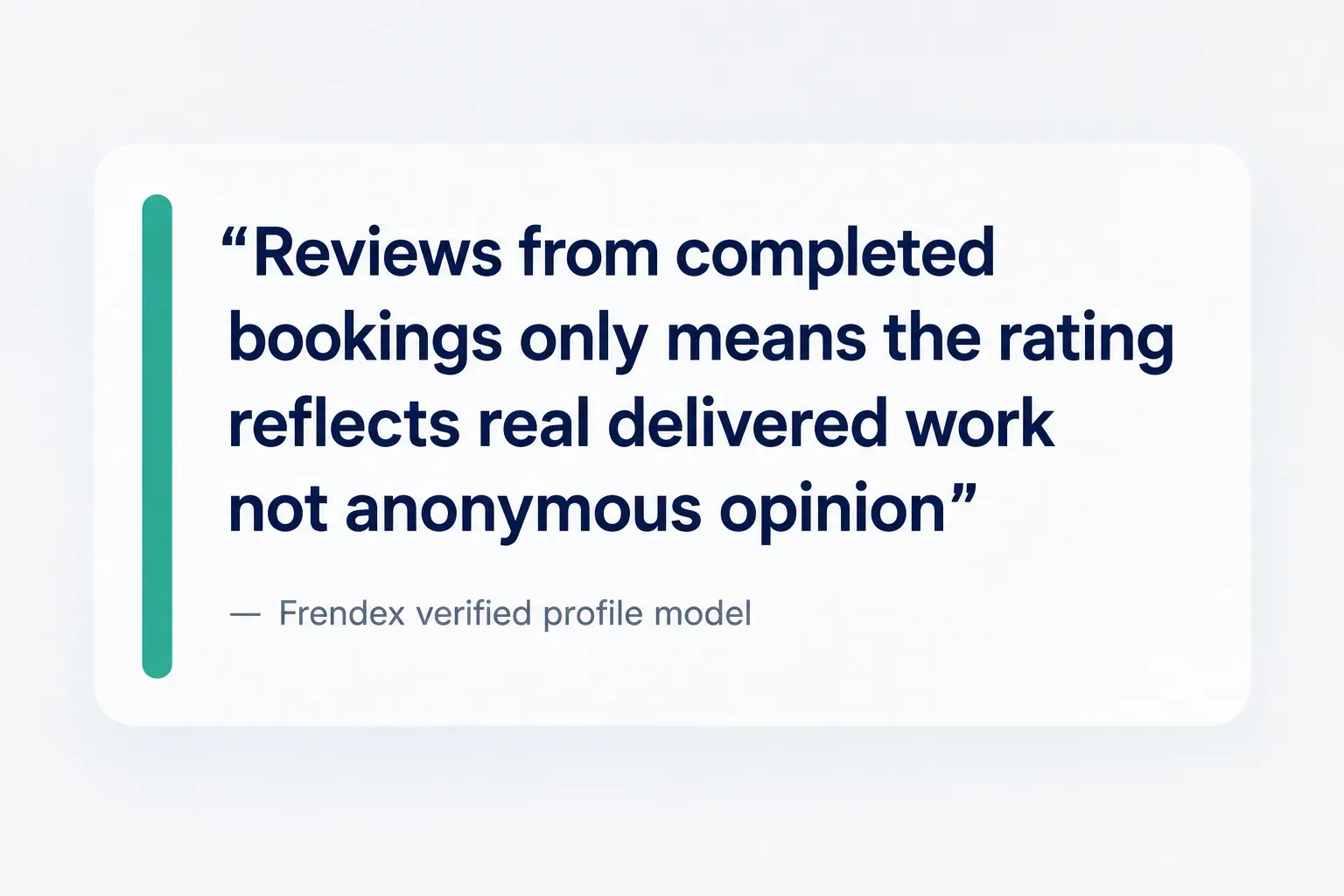
Providers hold verified profiles showing their services, prices, photos, and reviews, and those reviews come only from completed bookings, which removes the fake-review problem that plagues open directories.
Customers use customer-provider messaging in-app before booking, so questions about scope, access, or pricing get resolved without exchanging phone numbers. Availability appears on a live map rather than a static list, so someone searching at 9am sees who can actually come today.
Frendex charges providers a flat subscription with no per-booking commission, which matters when you are doing volume. And it shows the structural point clearly: discovery, trust signals, messaging, and booking belong in a single flow, because every handoff between them leaks customers.
From setup to measuring results
Most abandoned booking tools were never actually finished.
Setup stalled at 70%, the owner kept taking calls, and the subscription quietly renewed for eight months.
Here is the sequence that avoids that.
Your minimum viable setup
- Publish one service, not twelve. Pick your most-booked service, set its true duration including prep and cleanup, and set the price. Complexity can be added next week.
- Define availability windows honestly. Set the hours you genuinely want to work, plus minimum notice (two hours is common) and a booking horizon (60 days is typical).
- Connect your calendar two-way. Link the calendar that holds your personal commitments. Without calendar synchronization, you will be double-booked within a fortnight.
- Write the confirmation and reminder text yourself. Default templates are cold and often omit your address or cancellation policy. Five minutes here pays off repeatedly.
- Make one complete test booking. Book yourself as a customer on a phone, receive the confirmation, get the reminder, then cancel it. You will find at least one broken thing. Everyone does.
Getting your booking path everywhere
- Add the Google Business Profile booking link. This is the highest-intent placement available to local businesses, because the person searching is ready now. It also feeds your Maps listing.
- Put it in every social bio. Instagram, Facebook, TikTok. Link in bio, and pinned in your highlights if you use them.
- Add it to your email signature. Free, permanent, and it converts the people already in conversation with you.
- Print a QR code. Van door, shopfront window, receipt, business card. Mobile booking is the default now, so a QR code straight to your booking page removes every step in between.
- Reply to DMs with the link, not a question. Instead of “what day suits?”, send the link. It ends the back-and-forth immediately.
Privacy, accessibility, and what to test
- Collect only the fields you need. Name, contact, service, address if mobile. Every extra field on an intake form costs conversions and increases what you must protect.
- State retention and vendor access in a privacy policy. Say how long you keep customer profiles, who processes the data, and how someone requests deletion. As of 2026, this expectation applies to businesses of every size.
- Never store card details yourself. Use the platform’s payment processor for deposits and payments, and protect the admin account with a strong unique password and two-factor authentication.
- Run the accessibility checklist. Keyboard navigation through the whole flow, properly labelled fields, sufficient colour contrast on the date picker, and error messages that say what to fix rather than “invalid input”.
- Run the testing checklist. Complete the flow on a phone, book across time zones if you serve remotely, attempt an overlapping booking, cancel inside and outside the policy window, confirm reminders arrive, and test a declined card.
- Track six numbers monthly. Calendar utilization (booked hours as a share of available hours), booking conversion rate, average response time, no-show rate, repeat-booking rate, and revenue per available hour. That last one is the honest measure of whether any of this worked.
Review those figures on the same day each month. A no-show rate that climbs from 6% to 11% is a reminder-sequence problem you can fix in ten minutes, but only if you are looking.
Which setup fits you right now
Solo provider, one or two services, customers who already know you?
Publish a simple booking link or embedded scheduler this week.
One service, honest hours, connected calendar, one test booking.
That is an afternoon’s work, and it hands back most of the hours you currently lose to messages.
Local service business competing for visibility, where the real constraint is that people do not know you exist? Evaluate a marketplace model that combines discovery, verified reviews, in-app messaging, and booking in one flow, so the trust-building and the scheduling happen in the same place.
Either way, the worst option is the one you are running now.
Pick one, publish it, and stop scheduling by DM.
Frequently asked questions
What is the best booking system for a small business?
There is no single best system, because the right answer depends on whether your problem is admin or demand. If you already have customers and just need to stop the phone tag, a simple scheduler or an embedded website widget is correct. If you need new customers to find you, a discovery-driven marketplace that pairs booking with profiles, reviews, and messaging will do more for revenue than any standalone calendar tool.
What is the easiest appointment booking system for a small business?
The easiest system is one you can configure with a single service and be live the same day. Look for a tool that gives you a shareable booking link without requiring a website, connects to Google Calendar in a couple of clicks, and sends confirmations and reminders by default. Avoid anything demanding a full service catalog, staff rotas, and payment setup before you can publish.
How much does an online booking system cost for a small business?
Expect free tiers for basic single-user scheduling, roughly $15 to $40 per month for solo providers on paid plans, and $50 to $150 per month for small teams with staff scheduling and payments. Field service platforms typically charge per technician and run higher. Marketplaces vary: some take a commission on every booking, while others, including Frendex, charge providers a flat monthly fee with no per-booking commission, which is materially cheaper at volume.
Is there a free booking system for small businesses?
Yes, several platforms offer genuinely usable free tiers for one provider and one service type. The common limits are a single connected calendar, no SMS reminders (email only), no deposit collection, and platform branding on your booking page. That is often fine to start. The usual reason to upgrade is SMS reminders, since text reminders outperform email for reducing no-shows.
How do I create an online booking system for my business?
Start by mapping your services, true durations, and buffers on paper before choosing software. Then pick a platform matching your situation, publish one service with honest availability, connect your calendar two-way, and make a full test booking from your own phone. Once it works, distribute the link through your Google Business Profile, social bios, email signature, and a printed QR code.
What is the difference between an online booking system and appointment scheduling software?
Appointment scheduling software typically manages one provider's fixed-length slots against a synced calendar. An online booking system goes further: variable service durations, add-ons that extend time, multiple staff and locations, deposits, waitlists, and often customer-facing discovery. Scheduling software organises time you have already sold. A booking system helps sell it.
Need a hand with something?
The Frendex map shows you who is available near you, in real time.
Get the app free Get the app freeFree, no card needed
Related articles
A no-show policy that protects your business
A 5-part no-show policy framework, not a copy-paste template. Learn what to charge, when to waive it, and how to cut missed appointments fast.
A service business's guide to bad reviews
Not every 1-star review deserves an apology. Get the 6-category decision tree for replying to bad reviews without looking guilty or defensive.
Your practical roadmap to becoming self-employed
A step-by-step path to going self-employed: testing your idea, setting rates, and handling tax, without quitting your job on day one.